Studio
Studio is an implementation tool you can open from an Action when you need drafting help. It is the content co-pilot: a set of generators that help you produce content the engines will cite. Every tool produces a draft for your review — AI-assisted, never AI-driven — and every output moves through a draft → approved → shipped status that only you change.
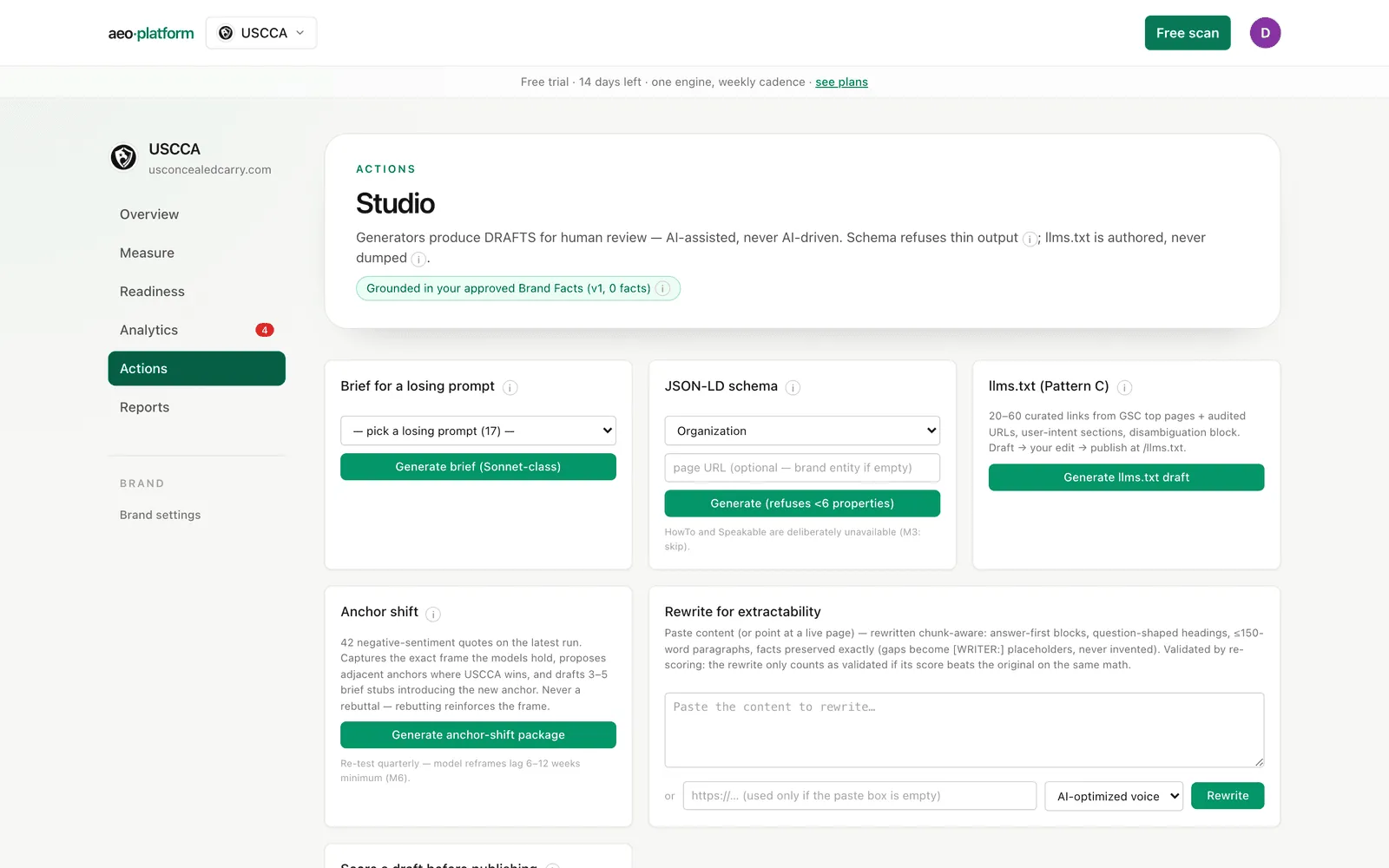
The grounding pill
Section titled “The grounding pill”Under the title, a pill tells you what the generators are grounded in. Green means they draw brand claims from your approved Brand Facts (with the version and fact count). Amber means no fact sheet has been approved yet, so the generators cannot ground brand claims — approve one on Brand profile first. A draft fact sheet never counts.
The generators
Section titled “The generators”- Brief for a losing prompt. Pick one of your losing questions — a panel question no engine cited you for on the latest check — and generate a content brief: the target query, who currently wins and why, a chunk-level outline, a schema package, and reviewer requirements.
- JSON-LD schema. Pick a schema type (Organization, Article, FAQPage, Product, and so on) and optionally a page URL. The output is validated, and the generator refuses to produce schema with fewer than six real properties — thin schema is worse than none. HowTo and Speakable are deliberately unavailable.
- llms.txt. Generates a curated
llms.txtdraft: 20 to 60 authored links pulled from your Search Console top pages and audited URLs, organized into user-intent sections with a disambiguation block. Never a sitemap dump. You edit the draft, then publish it at/llms.txt. - Anchor shift. When the latest check found negative-sentiment quotes about your brand, this generates a reframing package: it captures the exact frame the models hold, proposes adjacent anchors where you win, and drafts brief stubs introducing the new anchor. It is never a rebuttal — rebutting reinforces the frame. Expect model reframes to lag six to twelve weeks minimum, and re-test quarterly. The button stays disabled when there are no negative quotes to shift.
- Rewrite for extractability. Paste content (or point at a live page) and get a chunk-aware rewrite: answer-first blocks, question-shaped headings, short paragraphs. Your facts are preserved exactly — where a fact is missing, the rewrite inserts a
[WRITER: …]placeholder instead of inventing one. The rewrite only counts as validated if its re-scored extractability beats the original on the same math. - Draft scorer. Paste a markdown draft (or a URL — the live page is fetched as an AI crawler would see it) and get an extractability score from the audit’s twenty content checks, plus a per-item fix list. Publish-time items like title tags and schema are honestly marked n/a on a pasted draft rather than counted as failures. The result appears in the artifacts list below in about a minute.
Briefs can also be queued from outside Studio: the Generate brief button next to an uncovered question on Questions lands its draft here too.
Editorial calendar
Section titled “Editorial calendar”The calendar tracks your content pipeline with the AEO columns: title, pillar, AI citation target (a panel question or a free-text query), author, SME reviewer, and schema package. Each item has a status (planned → drafting → review → published) and a refresh tier: Tier 1 is refreshed every 90 days, Tier 2 every 6 months, YMYL every 60 days. When a published item passes its refresh date, it is flagged as due and files a refresh-due alert into Alerts. Clicking refreshed resets the tier window — the refresh should be a real content update, not just a new date.
Artifacts
Section titled “Artifacts”Everything the generators produce lands here, newest first. Each artifact shows its kind, validation result, status, and timestamp; expand it to read the full content. Draft scores show the score, pass percentage, and the per-check table with fix recipes; other kinds show their validation checks (and a warning badge if any failed). You move each artifact through draft → approved → shipped yourself — the tool never publishes anything.
If the list is empty, nothing is wrong: no artifacts exist until you generate the first one.
Related
Section titled “Related”- What to write about, and why: Action plan and the losing questions in Questions.
- The terms: extractability, llms.txt, anchor shift, refresh tier.