Connections
Connections is inside Brand settings. It manages external data integrations. A layer that stays unconnected is reported as unmeasured, never as zero.
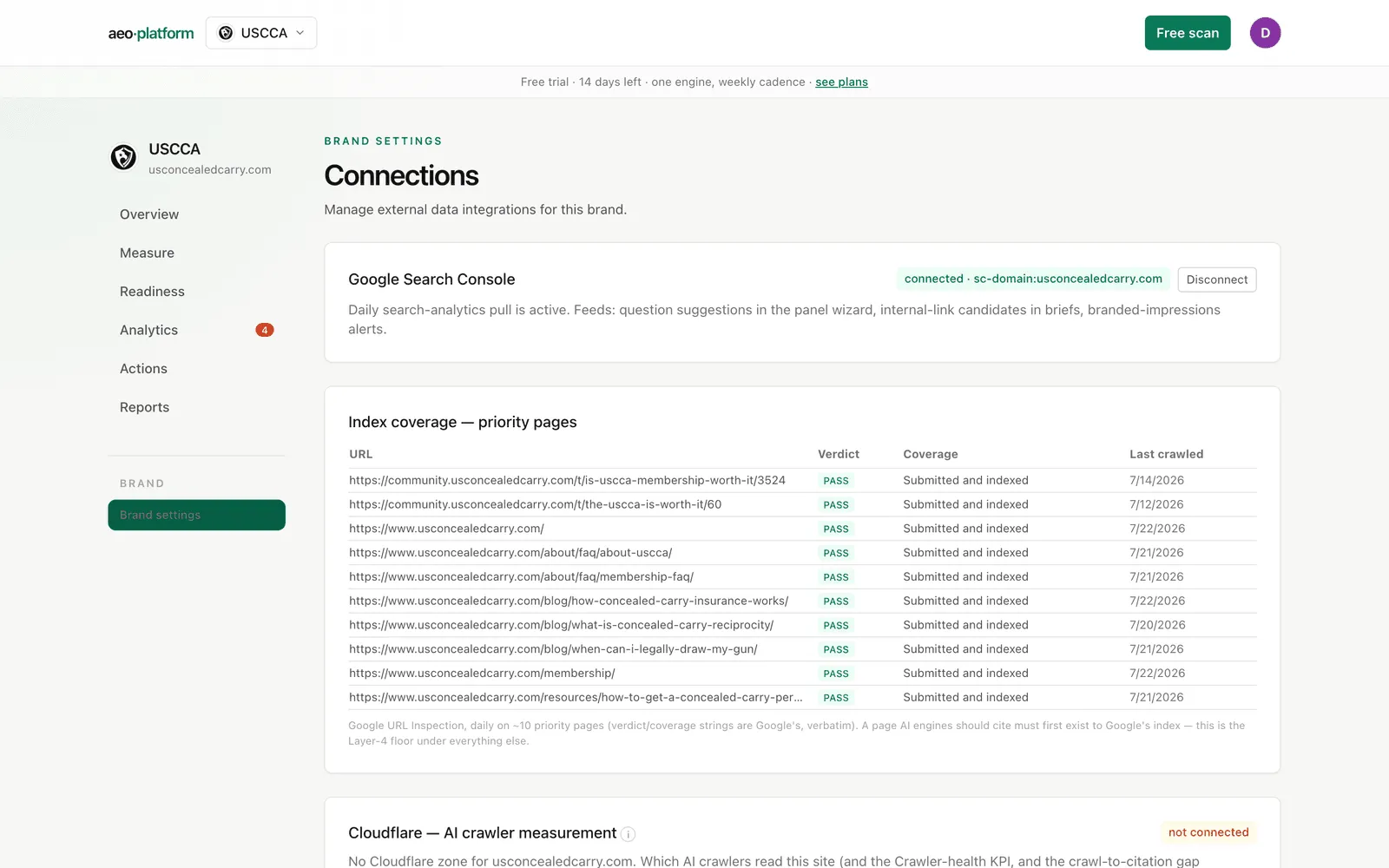
Google Search Console
Section titled “Google Search Console”The first card shows the connection state. If not connected, Connect GSC starts a one-time Google authorization. Once connected, a green badge names the property and the daily pull is active. Disconnect removes the stored authorization and selected property for this brand.
Index coverage — priority pages
Section titled “Index coverage — priority pages”Once Search Console is connected, a second card appears: a daily inspection of roughly ten priority pages, showing each URL’s verdict, coverage state, and last crawl date — Google’s own wording, verbatim. A page AI engines should cite must first exist in Google’s index; this table is the floor under everything else. If no inspections exist yet, the card says the daily job fills it in once search data exists.
Reading your schema when your site blocks our scanner
Section titled “Reading your schema when your site blocks our scanner”Some sites challenge or block non-Google crawlers at the CDN (a bot wall). When that happens on a Readiness scan, we can only recover your page as cleaned text, which strips the structured-data (JSON-LD) markup — so the schema check honestly reports it could not read your raw HTML, rather than a false failure.
Connecting Search Console unblocks this: Google’s own crawl is not blocked, so for a tracked brand with GSC connected we read the structured data Google itself detected on your homepage (its URL Inspection view) and turn the schema check into a real result. One limit, stated plainly: Google’s inspection reports only rich-result-eligible types (Breadcrumb, Product, FAQ, Article, and similar), not basic Organization/Website markup — so a page with only that basic markup shows as “no rich-result schema detected,” never as “no schema.” This only applies to tracked brands whose Search Console is connected; an anonymous scan keeps the “connect Search Console” prompt.
Cloudflare — AI crawler measurement
Section titled “Cloudflare — AI crawler measurement”Crawler analytics come from a Cloudflare zone for the brand’s domain. Connected, verified AI-bot visits are harvested daily into the crawler pane and the Crawler-health KPI on the Scorecard. Not connected, the card says so plainly: which AI crawlers read the site, the Crawler-health KPI, and the crawl-to-citation gap analysis are all unmeasured until a zone token is added — ask us to wire it when zone access exists.
GA4 — AI-influenced revenue (KPI 4)
Section titled “GA4 — AI-influenced revenue (KPI 4)”This card is the source for the Scorecard’s AI-influenced revenue KPI, and it connects the same way Search Console does: a per-brand OAuth handshake, no service account, nothing to install.
- Not connected — a Connect GA4 button starts a one-time Google authorization for read-only Analytics access. (During the guided add-brand flow you can do this inline; here it is available any time afterward.)
- Authorized, no property picked — an amber “authorized — pick the property below” badge and a dropdown of every GA4 property the account can see. Choosing one and clicking Use this property fires a 90-day backfill, then daily pulls take over. If the account sees no properties, the card says so and tells you to authorize with an account that has at least Viewer on the property.
- Connected — a green badge names the property and the card shows the data-through date. Disconnect removes the authorization and selected property. GA4 numbers settle over roughly 48 hours, so the tool re-pulls a trailing window daily rather than trusting the last day as final.
The important honesty point is where classification happens: the pull stores each day’s sessions, conversions, and revenue split by traffic source, verbatim, and the platform decides which sources count as “AI” at read time using its canonical referrer list — the same regex on the GA4 setup guide, applied platform-side. Nothing needs configuring inside GA4 itself, and when the quarterly review updates that regex, all stored history reclassifies without a re-pull. What lands on the Scorecard is an observed floor, never a modeled number; what that floor is and is not is spelled out on the setup page.
Survey responses (SRA)
Section titled “Survey responses (SRA)”Below the GA4 controls, a small SRA table is the human-side triangulation of the GA4 floor. It is a monthly tally of “how did you hear about us” answers that named an AI assistant, entered by hand (month, named-AI count, total responses, and the computed share) and always labeled self-reported — the tool does not control client survey forms, so manual entry is the only honest version of this number. It sits next to the GA4 floor so the two independent signals can be read together.
Site foundations
Section titled “Site foundations”Robots policy, AI-crawler access, sitemap coverage, and index diagnostics are grouped under Site foundations. The existing diagnostic cards remain available from that entry point.
robots.txt / llms.txt linter
Section titled “robots.txt / llms.txt linter”Click Run linter to parse the brand’s live robots.txt and llms.txt. The card shows a pass count, when it last ran, and one line per check — pass, warn, or fail, each with a short note. Failing items land in the Action plan automatically, and the linter re-runs weekly once started. One principle is fixed: the tool never recommends blocking search or user-triggered bots. On a challenged site, some checks honestly degrade to warn with the reason stated rather than guessing.
AI access — per bot
Section titled “AI access — per bot”A table of the major AI crawlers and whether each can actually reach the site. Every cell states what was measured and where the evidence came from, drawn from three sources of different strength:
- Verified CDN crawl logs — ground truth: the bot really visited (spoofs excluded).
- The LLM fetch probe — each lab’s own browsing fetcher, tried directly; an indirect signal (it is not the crawler bot itself), run only when a scan finds the site challenged.
- The latest robots.txt lint — declared policy, which is not the same as behavior.
The verdict per bot is conservative, and a “—” means unmeasured — never assumed reachable from robots.txt alone. Blocked or challenged bots come with a concrete how-to-unblock recipe.
Sitemap coverage
Section titled “Sitemap coverage”The tool stores the brand’s sitemap (synced weekly) and crosses it with verified AI-bot visits from the last 30 days, per site directory: pages in the sitemap, pages crawled, and a coverage percentage, with an all-directories total. Two honest caveats printed right on the card:
- A page can be cited without a recent crawl — low coverage flags unread sections, not invisibility.
- With no Cloudflare zone connected, the crawled side is unmeasured, so 0% here means unmeasured, not unvisited.
If no sitemap is stored yet, the card explains why: the weekly sync has not run, or the site’s robots.txt/sitemap is unreachable from our vantage (bot-challenged or missing).
Related
Section titled “Related”- What crawler data unlocks: the four layers.
- The GA4 channel walkthrough: GA4 setup.
- Where failing checks go: Action plan.