Measure
Measure is where you manage the question set that the platform repeats across AI engines. Its header shows the active, proposed, and archived questions, and Refine question set opens the wizard when your market changes.
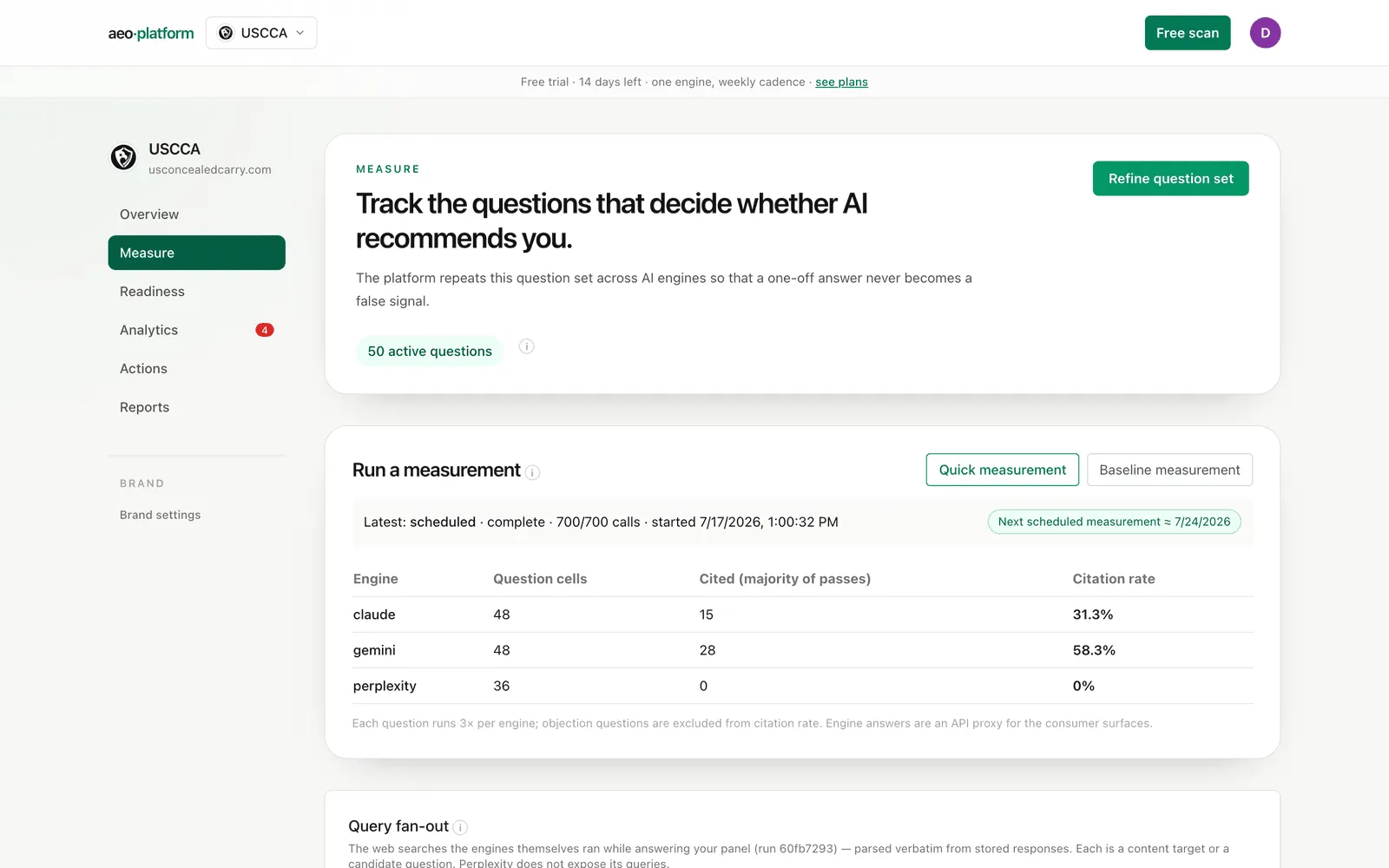
Measurements
Section titled “Measurements”The Run a measurement card is where panel runs start. Quick measurement asks every active question on the four AI engines plus Google AI surfaces; Baseline measurement does the same as a firmer starting measurement. How many passes each question gets per engine is a platform setting (the run’s real pass count is always shown on its results); whenever more than one pass runs, a cell only counts “cited” when a majority of its passes cite you (see replicates). Both buttons disable while a measurement is running and re-enable when it finishes.
Under the buttons, a status line shows the latest run (kind, status, calls completed so far, start time) next to a next scheduled measurement pill. If the brand has a weekly cadence, the pill estimates when the next automatic run fires; if scheduling is off, it says Scheduled measurements off rather than implying a run that will never come. Once a measurement completes, a per-engine table shows question cells, cited cells, and the citation rate. Objection questions are excluded from citation rate, and engine answers are an API proxy for the consumer surfaces.
Query fan-out
Section titled “Query fan-out”This table shows the web searches the engines themselves ran while answering your panel, parsed verbatim from their stored responses. Each row is a content target or a candidate question your buyers effectively asked through the machine. (Perplexity does not expose its queries, so it never appears here.)
Above the table sits the language mix: the percentage of fan-out sub-searches run in English, with per-engine chips and examples of any non-English queries. The engines often research in English even when the buyer’s question is not, which means the pages competing for those citations are English pages. An all-US panel will honestly read 100%; the number earns its keep on non-English markets. Very short queries are reported as “undetermined” and excluded from the share, never guessed.
Each query carries an intent label and a Type badge:
- search — a reformulation of one of your questions.
- shopping — explicit buying terms.
- synthetic — the engine invented an adjacent query mostly from words your question never contained. These are angles you would not have guessed.
Queries you already track show a “tracked” chip. For the rest, Add to panel files the query as an active prompt (it joins the next check), and Propose parks it as a proposed question — kept and free until you decide.
Word transformations
Section titled “Word transformations”Below the fan-out table, a list of the words the engines added on their own when rewriting your questions into searches — none of them appear in your prompts. Each is a content-angle signal: a modifier the models believe your buyers care about, with its count, its share of fan-out queries, and an example. It is a deterministic word diff, not an AI judgment.
Page coverage
Section titled “Page coverage”For every question, the tool checks whether your site has a page that covers it, on three evidence classes:
- covered — an engine actually cited one of your pages for this question (observed).
- candidates — pages match on Search Console or wording signals, but have never been cited.
- no page — nothing on your site matches. These questions need content, not optimization.
The card summarizes the three counts, lists the uncovered questions, and puts a Generate brief button on each — the brief lands as a draft in Studio. Coverage refreshes automatically after each completed check (and weekly); Re-check coverage runs it now. If it has never run, the card says so plainly — a blank here means “not yet computed,” not zero coverage.
The panel itself
Section titled “The panel itself”The bottom of the page lists every prompt, grouped into six categories (commercial, comparative, use case, brand-aware, objection, informational). The panel is a stratified matrix, not a flat list: categories crossed with personas and sub-topics, each prompt tagged with a funnel stage. Each row shows the prompt’s persona, sub-topic, funnel stage, its page-coverage badge, and its status, with one-click activate, park, and archive actions. Paraphrase variants are marked and average into their canonical prompt’s metrics rather than counting separately.
The wizard
Section titled “The wizard”Rebuild panel opens the wizard. It generates the stratified panel, pulls in question-shaped queries your site already gets impressions for (Search Console, last 28 days) as one-click suggestions, and gives every row a Track checkbox — checked rows activate, unchecked rows park as proposed. You review and edit everything first; nothing runs until you activate.
Related
Section titled “Related”- The answers these questions produce: Answers.
- Write the missing pages: Studio.
- The terms: panel, replicate, query fan-out, word transformation.