Outreach
Outreach is an implementation tool reached from an Action when it is relevant. It turns citation data into a target list. The domains the AI engines already cite when answering your market’s questions are where a mention is worth earning — an unlinked mention on a trusted source beats a backlink for AI visibility. The whole screen reads from your latest completed check, and a Download CSV button at the top exports the target list for your PR workflow.
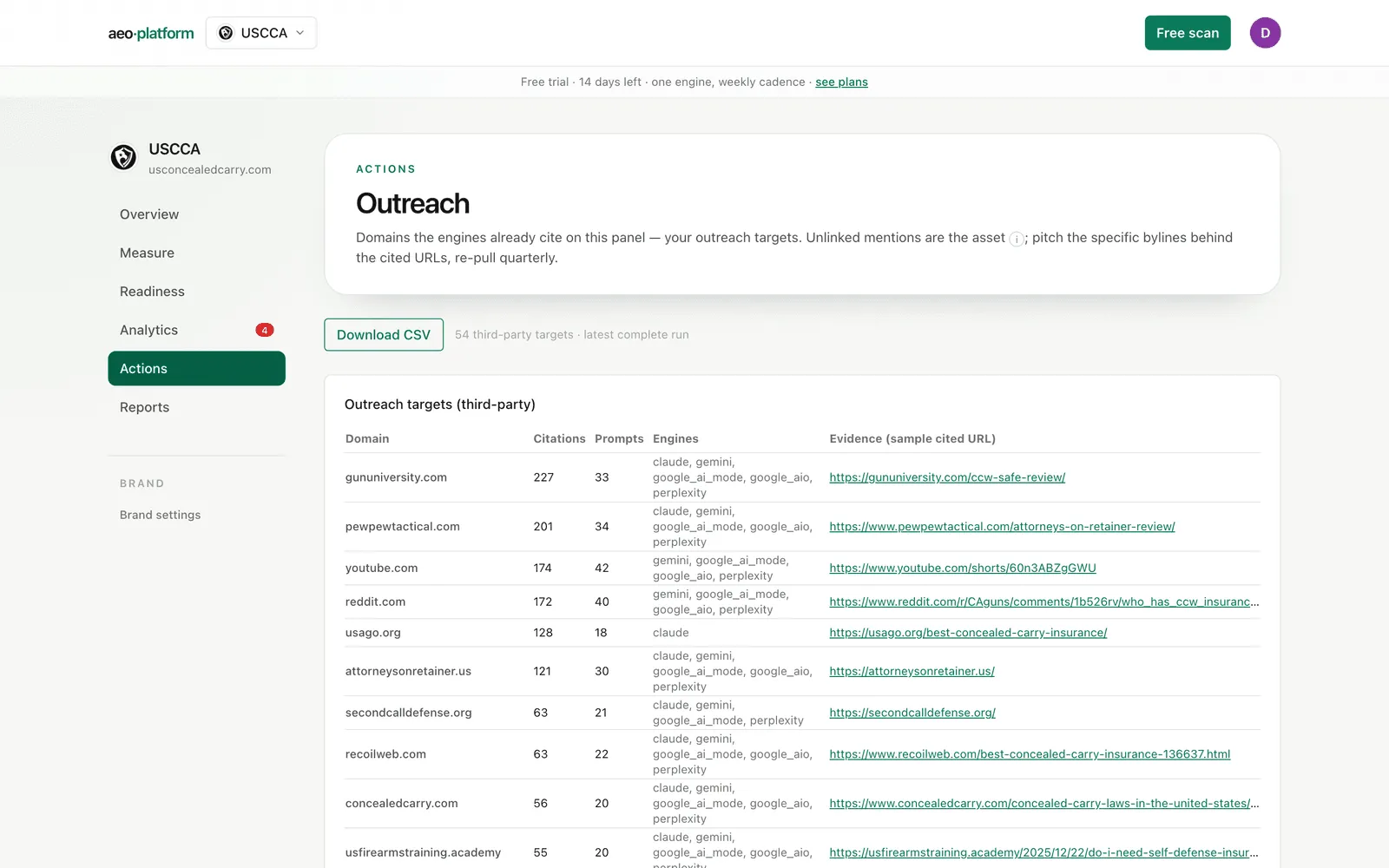
Outreach targets
Section titled “Outreach targets”The first table lists the third-party domains cited on your panel: citations, how many of your questions they appear in, which engines cite them, and a sample cited URL as evidence. Typically 10–20 domains carry the bulk of citations — pitch the specific bylines behind those sample URLs rather than the domain generically. Your own domains and competitor domains are pulled out into a separate Context line below the table; they are informative, not pitchable.
If the table says “No citation data yet,” the brand simply has no completed check with citations — run one first. An empty list is the tool waiting for data, not hiding it.
Source intelligence
Section titled “Source intelligence”The next section profiles your top cited domains. Each row shows:
- Source type — editorial, forum, social, review, reference, vendor, government. A row marked unclassified has not been classified yet; the tool never guesses a type.
- Flags — whether the domain is your own or a competitor’s.
- Used % and avg cites/answer — two deliberately different numbers. Used % is the share of all answers that cite the domain at least once; avg cites/answer is how many citations it collects per answer. High-Used/low-avg is background presence everywhere; low-Used/high-avg is a page the engines lean on hard when it appears — a different kind of target.
Click any row to expand its top cited URLs: per-URL citation counts, the split across engines, and the brands co-mentioned in answers citing that URL (yours highlighted). This is the drill-down that tells you which page — and therefore which byline — to pitch. A link at the bottom opens the Answers log for the raw responses behind the numbers.
Movers
Section titled “Movers”Movers compares your two most recent completed checks and shows four lists: Top (most cited now), Trending (biggest gain), Losing (biggest drop, with a “gone” tag for sources that vanished entirely), and New (absent last run). An expandable URL movers panel shows the same four lists at page level — the specific URLs gaining and losing citations.
A source the engines just started citing is a door that opened; pitch it while it is warm. With only one completed check, the section says so and waits — deltas need two runs, and the tool will not invent a comparison.
Competitor evidence gaps
Section titled “Competitor evidence gaps”The gap table is the highest-leverage list on the page: domains that supply the engines with evidence in answers where a competitor is named and you are absent. Each row shows how many answers cite the domain, in how many you are present, in how many only a competitor appears, and the resulting gap share.
Each gap row has a Draft pitch button. It drafts a pitch angle and outreach email grounded in that domain’s stored citation evidence — what the engines actually quoted from it — and the draft lands in Studio for review. A pitch is never sent automatically. One honest exception: a competitor’s own site appears in the gap table (it is real evidence) but is not pitchable — the button is replaced by a note, because you win those answers with content, not outreach.
Once drafts exist, a Drafted pitches table at the bottom tracks each one’s status and whether its quality checks passed, with review and approval in Studio.